Every click, login, online purchase, social media post, and digital interaction leaves behind a trail of personal information. While technology has made life more convenient, it has also created opportunities for cybercriminals to exploit personal data.
Identity theft, phishing scams, financial fraud, account takeovers, and privacy breaches are increasing globally. Many people assume cybersecurity is only a concern for businesses or IT professionals. In reality, every internet user has a digital identity worth protecting.
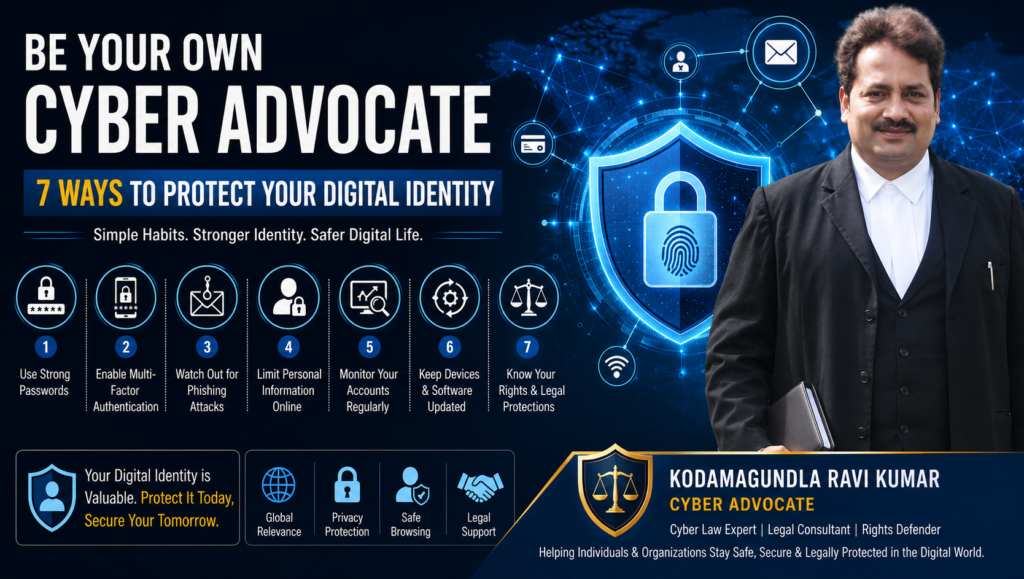
This guide explains 7 practical ways to protect your digital identity and reduce your risk of becoming a cybercrime victim.
What Are the Best Ways to Protect Your Digital Identity?
The most effective ways to protect your digital identity include:
- Use strong and unique passwords
- Enable multi-factor authentication (MFA)
- Be cautious of phishing attacks
- Limit personal information shared online
- Monitor financial and online accounts regularly
- Keep devices and software updated
- Understand your legal rights and cyber protections
Following these seven steps can significantly reduce the risk of identity theft, account hacking, financial fraud, and privacy violations.
Why Protecting Your Digital Identity Matters
Your digital identity consists of:
- Personal information
- Email accounts
- Banking credentials
- Social media profiles
- Government-issued IDs
- Online shopping accounts
- Professional profiles
- Digital payment wallets
Cybercriminals target this information because it can be used for:
- Financial fraud
- Unauthorized transactions
- Fake account creation
- Reputation damage
- Data blackmail
- Corporate espionage
- Identity theft
Many victims only discover a breach after financial losses or account compromise have already occurred.
Protecting your digital identity is no longer optional—it is a necessity.
1. Use Strong and Unique Passwords
Why It Matters
Weak passwords remain one of the leading causes of account breaches.
Examples of poor passwords:
- 123456
- password
- your name
- birthdate
- mobile number
Cybercriminals use automated tools that can crack weak passwords within seconds.
Best Practices
- Use at least 12–16 characters
- Include uppercase and lowercase letters
- Use numbers and symbols
- Avoid personal information
- Never reuse passwords across multiple platforms
Expert Tip
A password manager can securely generate and store unique passwords for every account.
2. Enable Multi-Factor Authentication (MFA)
What Is MFA?
Multi-Factor Authentication requires users to verify their identity using more than one method.
Examples include:
- SMS verification codes
- Authentication apps
- Biometric verification
- Security keys
Even if hackers obtain your password, MFA creates an additional layer of protection.
Why MFA Is Better Than Passwords Alone
| Password Only | Password + MFA |
| Easier to hack | Significantly harder to compromise |
| Single security layer | Multiple security layers |
| Higher risk | Reduced risk |
For most users, enabling MFA is one of the fastest cybersecurity improvements available.
3. Learn to Identify Phishing Attacks
What Is Phishing?
Phishing occurs when attackers impersonate trusted organizations to steal sensitive information.
Common phishing methods include:
- Fake banking emails
- Fraudulent delivery notifications
- Social media account alerts
- Job offer scams
- Cryptocurrency fraud schemes
Warning Signs
- Urgent requests for action
- Suspicious links
- Grammar mistakes
- Requests for passwords
- Unexpected attachments
Real-World Example
A user receives an email claiming their bank account will be suspended unless they verify details immediately. The link redirects to a fake login page where credentials are stolen.
Always verify directly through official websites.
4. Limit Personal Information Shared Online
The Hidden Risk of Oversharing
Many cybercriminals gather information from publicly available sources.
Examples include:
- Birthdays
- Phone numbers
- Family details
- Addresses
- Travel plans
- Workplace information
This information can be used to answer security questions or conduct social engineering attacks.
Smart Privacy Habits
- Review privacy settings regularly
- Restrict profile visibility
- Avoid sharing sensitive documents
- Think before posting personal milestones
The less information available publicly, the fewer opportunities criminals have to exploit it.
5. Monitor Your Accounts Regularly
Early Detection Prevents Major Losses
Many fraud cases begin with small unauthorized activities.
Monitor:
- Bank statements
- Credit card transactions
- Email login activity
- Social media access logs
- E-commerce purchase history
What to Do If Something Looks Suspicious
- Change passwords immediately
- Report unauthorized activity
- Contact financial institutions
- Document evidence
- Seek legal cyber assistance when necessary
Quick action often prevents further damage.
6. Keep Devices and Software Updated
Why Updates Matter
Software updates frequently contain security patches that address newly discovered vulnerabilities.
Ignoring updates leaves devices exposed to:
- Malware
- Ransomware
- Spyware
- Data theft
Devices That Require Regular Updates
- Smartphones
- Tablets
- Computers
- Routers
- Smart home devices
Automatic updates are highly recommended.
7. Know Your Cyber Rights and Legal Remedies
Cybersecurity Is Not Only Technical
Many people focus on technology while overlooking legal protection.
Understanding cyber laws helps victims respond effectively when incidents occur.
Common Cybercrime Situations
- Identity theft
- Online impersonation
- Social media abuse
- Financial fraud
- Data breaches
- Defamation through digital platforms
When to Consult a Cyber Advocate
Consider professional legal guidance if:
- Your accounts have been compromised
- Personal data has been misused
- You face online harassment
- Financial fraud has occurred
- A platform refuses to remove harmful content
Cyber Advocate Kodamagundla Ravi Kumar assists individuals and organizations in understanding legal options when cyber incidents affect their rights, privacy, or finances.
Common Mistakes People Make When Protecting Their Digital Identity
Many victims unknowingly increase their risk by:
- Reusing passwords
- Ignoring software updates
- Clicking unknown links
- Sharing OTPs
- Using public Wi-Fi without protection
- Posting excessive personal information
- Delaying action after suspicious activity
Avoiding these mistakes significantly improves digital security.
Digital Identity Protection: Individual vs Reactive Recovery
| Proactive Protection | Reactive Recovery |
| Prevents incidents | Responds after damage |
| Lower cost | Potentially expensive |
| Less stress | Time-consuming |
| Better privacy | Possible data exposure |
| Stronger security | Limited recovery options |
Prevention is almost always more effective than recovery.
Why Digital Identity Protection Matters Everywhere
Cyber threats are not limited to any one country.
Whether you live in:
- India
- United States
- United Kingdom
- Canada
- Australia
- Europe
- Middle East
The risks remain similar.
Global digital connectivity means cybercriminals can target victims across borders, making digital identity protection a universal necessity.
Industry-Specific Examples
Students
Protect educational accounts and scholarship information.
Professionals
Secure LinkedIn profiles, work emails, and business data.
Business Owners
Protect customer information and financial systems.
Senior Citizens
Remain vigilant against banking and impersonation scams.
Remote Workers
Use secure networks and encrypted communication tools.
How Should People Think About Digital Identity Protection?
The smartest approach is not to ask:
“Can I avoid cyber threats completely?”
Instead ask:
“How can I make myself a difficult target?”
Most cybercriminals seek easy opportunities. By combining strong passwords, MFA, privacy awareness, regular monitoring, software updates, and legal knowledge, individuals dramatically reduce their risk.
Digital identity protection is not a one-time task. It is an ongoing habit.
The people most successful at staying safe online are those who remain informed, proactive, and prepared.
Conclusion
Protecting your digital identity is one of the most important responsibilities in today’s connected world. Cyber threats continue to evolve, but practical habits can dramatically improve your security.
By implementing these seven strategies:
- Strong passwords
- Multi-factor authentication
- Phishing awareness
- Privacy controls
- Account monitoring
- Software updates
- Legal awareness
you can reduce your exposure to cybercrime and respond more effectively when risks arise.
As a Cyber Advocate, I encourage every individual to take proactive steps to protect their digital identity. Cybersecurity is no longer just a technical concern—it is a personal, financial, and legal responsibility that affects us all in today’s connected world.
Frequently Asked Questions
Use strong passwords, MFA, software updates, account monitoring, and privacy controls.
Phishing attacks remain one of the most common causes of identity theft and account compromise.
Yes. MFA significantly reduces the likelihood of unauthorized access.
Immediately secure accounts, notify financial institutions, preserve evidence, and seek legal guidance.
Yes. Excessive sharing can provide cybercriminals with information useful for impersonation and fraud.
Many reputable password managers provide strong security, but users should research trusted providers.